
LoTW synchronisation, without the routine work.
QSO Director takes the routine work out of ARRL's Logbook of The World (LoTW). Once configured with your existing TQSL installation, it can automatically submit new QSOs, download confirmations and show confirmed status in your Worked Matrix.
Already have years of contacts? Reconcile your existing logbook with LoTW. Let the integration run quietly in the background, or open the dedicated LoTW tool whenever you want to see progress or take manual control.
Explore Automatic Synchronisation →
Available for Windows, macOS and Linux.
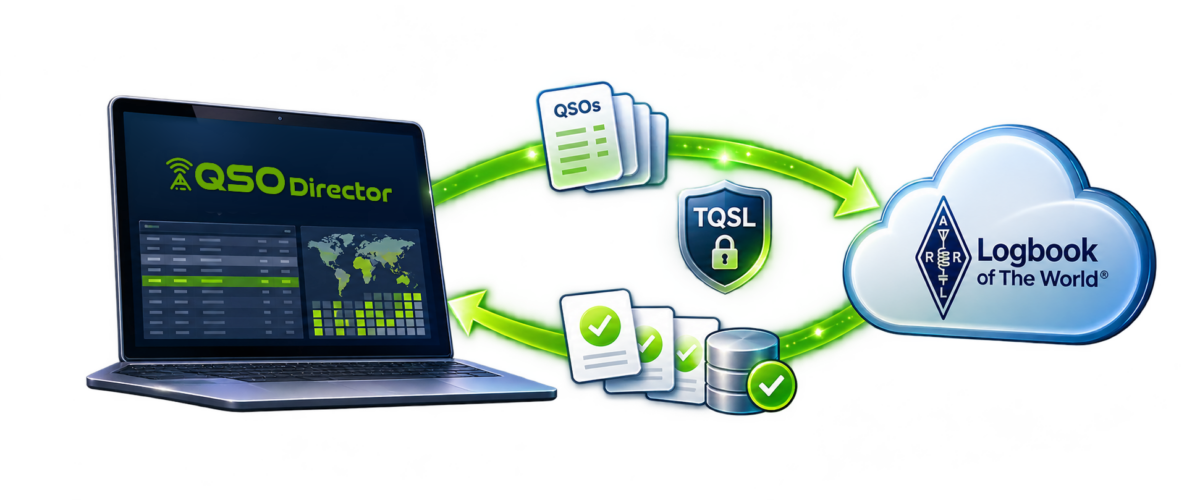
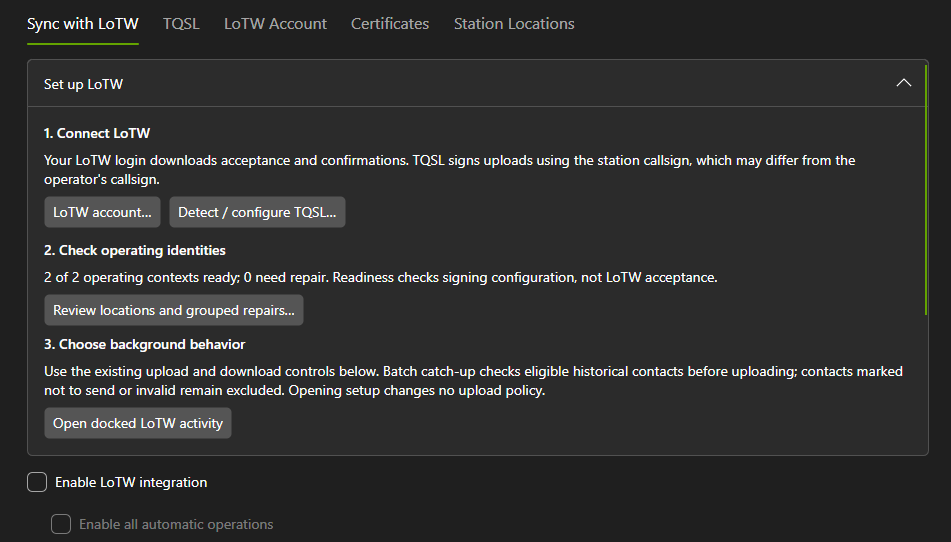
AUTOMATIC LOTW SYNCHRONISATION
Set it up. Let QSO Director take care of the rest.
Once connected to your existing TQSL installation and configured for LoTW, QSO Director can handle routine QSO uploads and confirmation downloads automatically.
No repeated ADIF exports, manual signing or uploading contacts after every operating session. Your LoTW integration works quietly in the background while you concentrate on making contacts.
Automatic uploads, without the administration
QSO Director manages the submission of your logged contacts to LoTW, keeping track of QSOs awaiting upload and handling routine synchronisation automatically.
There's no need to make uploading contacts another task at the end of each operating session.
New QSOs? Upload them immediately.
Prefer your contacts to reach LoTW as soon as possible?
Enable immediate uploads and QSO Director will automatically initiate submission of newly logged contacts, rather than waiting for routine background synchronisation.
Your confirmations come back automatically
QSO Director can automatically download confirmation information from LoTW and match it against existing QSOs in your logbook.
Those confirmations are then available within the Worked Matrix, bringing worked and confirmed information together across bands and modes.
TQSL INTEGRATION
Your existing TQSL setup, intelligently connected.
Already using TQSL for Logbook of The World? QSO Director works with your existing installation, making it straightforward to connect your established LoTW configuration to your logging workflow.
Simply tell QSO Director where TQSL is installed, and it can automatically discover the available callsign certificates, providing the foundation for automated LoTW submissions.
Keep using your existing TQSL installation
There's no need to replace TQSL or set up an entirely separate signing system.
QSO Director integrates with the TQSL installation you already use, allowing it to handle QSO signing as part of the LoTW upload process.
Automatic certificate discovery
Once QSO Director knows where TQSL is installed, it automatically identifies the available callsign certificates.
This removes the need to manually identify each certificate within QSO Director and helps simplify the initial integration setup.
Ready for multiple stations and locations
Discovering your certificates is just the beginning.
QSO Director can also automatically establish associations between your configured stations and operating locations and their LoTW counterparts, helping ensure contacts are submitted using the appropriate configuration.
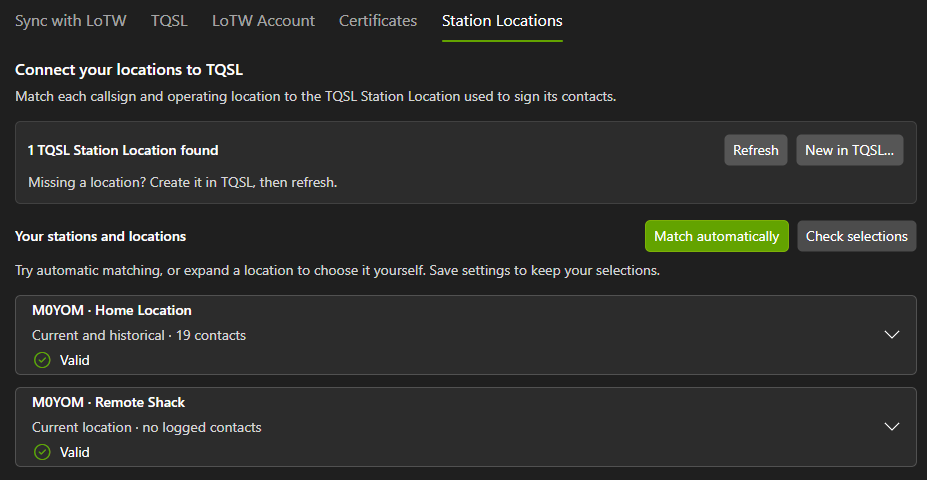
STATION & LOCATION MATCHING
Your stations and LoTW locations, intelligently matched.
Operating from more than one station or location shouldn't mean repeatedly managing which LoTW configuration belongs to each contact.
QSO Director can automatically associate your configured stations and operating locations with their corresponding LoTW station locations in TQSL, helping ensure that QSOs are submitted using the appropriate configuration.
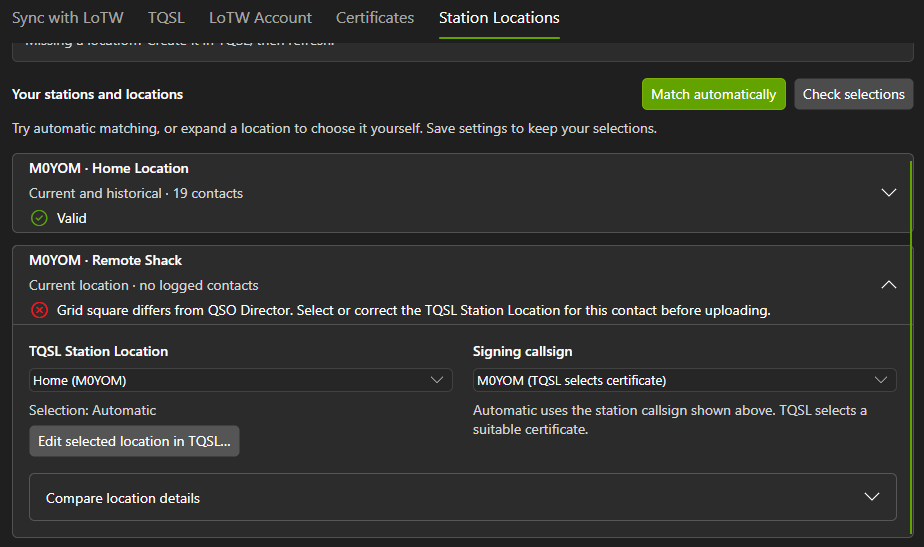
And when something doesn't match, QSO Director helps you understand why.
Automatic association, less manual configuration
QSO Director examines your configured stations and operating locations and attempts to match them with their LoTW counterparts automatically.
This reduces the work involved in setting up LoTW integration, especially when you operate from multiple locations or use different station configurations.
You're always in control
Prefer to choose the associations yourself? Or has QSO Director been unable to identify a suitable match?
You can manually associate your QSO Director stations and locations with the appropriate LoTW configurations, giving you control over how your contacts are submitted.
See exactly where configurations differ
Even when two locations appear to correspond, their configured details may not be identical.
QSO Director identifies discrepancies and displays the values from QSO Director and TQSL side by side, making it easier to see what needs attention.
Some differences can prevent affected QSOs from being uploaded until they're resolved. Rather than leaving you to investigate the problem without context, QSO Director highlights the differences so you can make the necessary corrections.
AUTOMATIC LOTW RECONCILIATION
Already uploaded to LoTW? QSO Director takes care of that too.
Moving to a new logging application shouldn't mean losing track of years of previous LoTW submissions.
Whether your contacts were previously uploaded through TQSL or another logging application, QSO Director automatically reconciles your existing logbook with your LoTW history.
Your existing submissions, recognised automatically
QSO Director takes account of contacts already submitted to LoTW, rather than simply assuming every existing QSO needs to be uploaded again.
The reconciliation process runs automatically, helping bring your existing records into alignment with LoTW without requiring you to manually review and update individual contacts.
A seamless transition to ongoing synchronisation
Once your existing history has been reconciled, new QSOs become part of the same automatic LoTW workflow.
With ongoing uploads and confirmation downloads handled in the background, you can concentrate on operating rather than managing the history of your LoTW submissions.
LOTW MONITORING & CONTROL
Fully automatic when you want it. Full visibility when you need it.
The best automation is the kind you rarely have to think about.
QSO Director handles LoTW uploads and confirmation downloads in the background, without requiring you to keep a separate window open or constantly check its progress.
But when you want to see exactly what's happening, the dedicated LoTW tool puts the information and controls you need in one place.
LOTW CONFIRMATIONS & WORKED MATRIX
Your LoTW confirmations, reflected in your operating history.
Getting your QSOs uploaded to LoTW is only half the story. When contacts are confirmed, that information should be available where it's useful — in your logging and operating workflow.
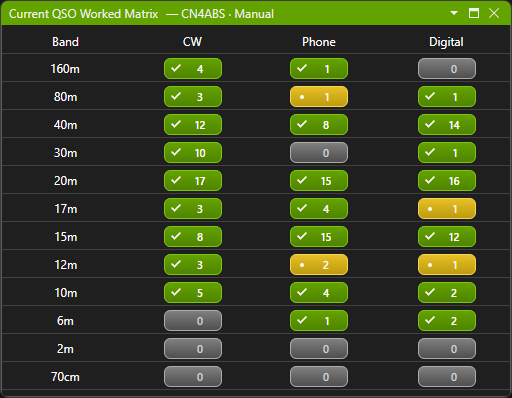
QSO Director automatically downloads LoTW confirmations and matches them with your logged contacts, bringing confirmed status into the Worked Matrix alongside your existing QSO history.
Worked and confirmed, at a glance
The Worked Matrix gives you a clear view of which band and mode combinations you've worked and which have been confirmed.
See the difference between making a contact and receiving its confirmation, without having to check LoTW separately.
Explore callsigns and DXCC entities
Switch between individual callsign and DXCC entity views to explore your worked and confirmed status across bands and modes.
Whether you're reviewing previous contacts with a particular station or checking your DXCC operating history, the Worked Matrix keeps that information organised and accessible.
Confirmation information, where you need it
Your LoTW confirmations become part of QSO Director's wider logging environment, giving you a more complete picture of your operating history without additional manual updates.
LOTW INTEGRATION FAQ
Frequently asked questions about LoTW integration
From connecting your existing TQSL installation to managing automatic uploads and confirmations, here's what you need to know about using Logbook of The World with QSO Director.