
QSO logging that works with your station.
From everyday contacts to detailed operating records, QSO Director brings live radio information, callsign lookups and previous QSO history into one connected logging workflow.
Log the information you need, then search, edit and maintain your contacts without leaving the application.
Available for Windows, macOS and Linux.
QSO ENTRY
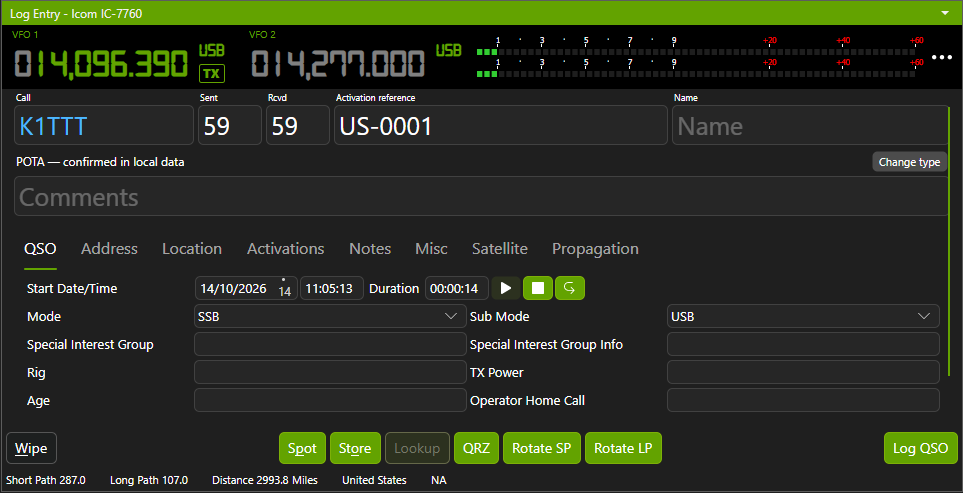
Log a QSO without breaking your flow.
Some contacts need little more than a callsign and signal report. Others deserve a more detailed record.
QSO Director gives you the flexibility to log both, with simple and detailed QSO Entry views that let you capture the information you need without unnecessary complexity.
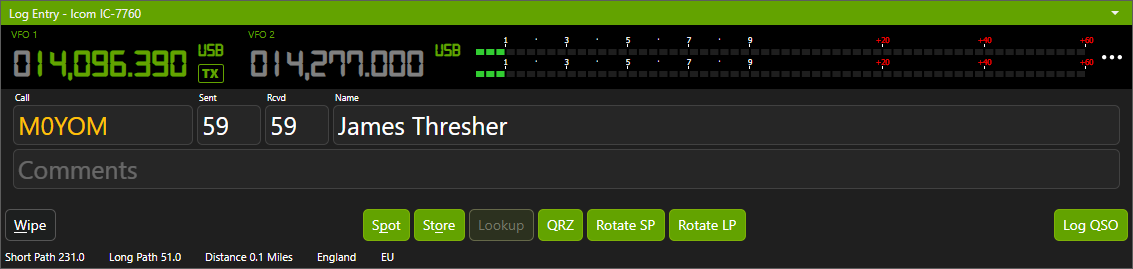
Keep it simple
For everyday contacts, a clean, focused entry view keeps the essential fields within easy reach. Record the details and move on to your next QSO.
More detail when you need it
Switch to the detailed view when you want to capture additional information about the contact, station, operator or operating conditions. The flexibility is there without making every QSO complicated.
Your radio information, already there
Connect a supported radio and QSO Director can automatically populate frequency and mode information. Your configured station and operator details can also be populated automatically, reducing repetitive entry and helping maintain consistent records.
CALLSIGN INFORMATION & HISTORY
Know who you're working before you log them.
Enter a callsign and QSO Director brings more than an empty log entry into view.
See previous contacts with the station, retrieve callsign information and automatically populate geographical details. Everything works together to give you useful context while you're making the contact, without interrupting your logging workflow.
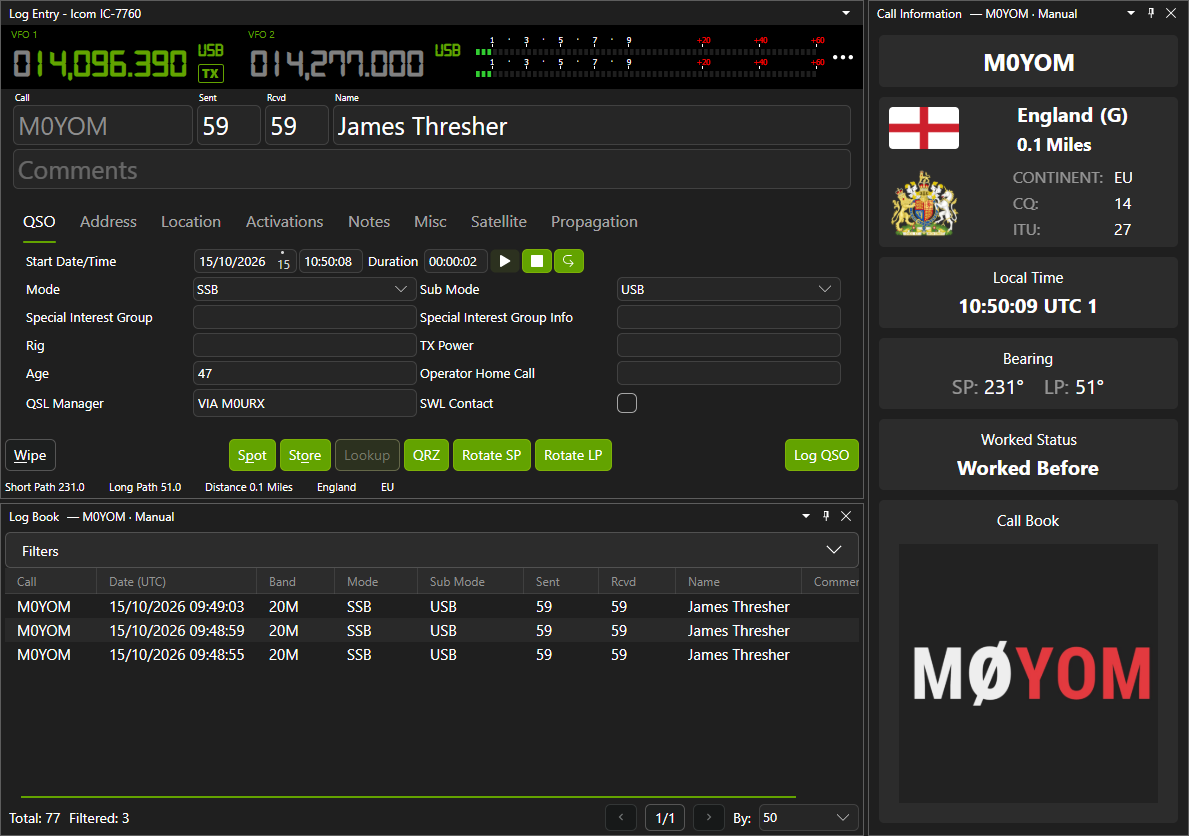
Previous contacts, at a glance
See your previous QSOs with a station as you enter its callsign. Recognise familiar operators, revisit your contact history and know whether you've worked them before without searching through your entire logbook.
Callsign details, automatically
QSO Director integrates with established online callbook services to retrieve operator and station information. Available details can be used to populate your QSO fields automatically, reducing repetitive typing and helping keep your records consistent.
Geographical information, built in
DXCC entities, CQ and ITU zones, Maidenhead grids, distances and bearings all provide valuable context when logging a contact.
QSO Director can automatically calculate and populate these details using the available callsign and location information, so you don't have to look them up individually.
LOGBOOK MANAGEMENT
Your logbook. Organised around the way you operate.
Every QSO becomes part of your operating history. Whether you're looking for a particular contact, reviewing past activity or correcting an existing record, QSO Director gives you the tools to find and manage the information you need.
With powerful searching, filtering and sorting, alongside a customisable logbook view, your contacts remain accessible and organised as your logbook grows.
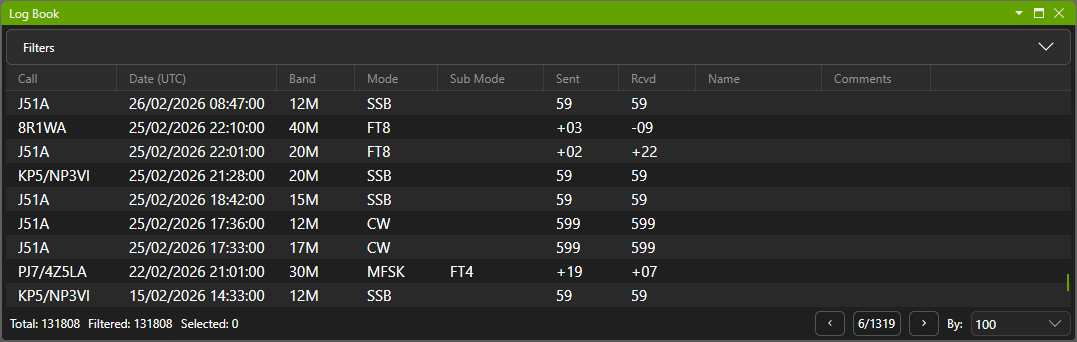
Find the contacts you're looking for
Search, filter and sort your QSOs to quickly locate the records you need. Whether you're looking for a particular station or reviewing contacts from previous operating sessions, there's no need to work through your logbook manually.
See the information that matters to you
Choose which QSO fields appear in your logbook and arrange the columns to suit your preferences. From a focused view of essential contact details to a more comprehensive record, QSO Director lets you decide what you see.
Your column preferences are remembered as part of your workspace layout.
Review and edit existing contacts
Need to correct an incorrect signal report, update a callsign or amend a contact's details?
Open an existing QSO, make the necessary changes and keep your operating history accurate and up to date.
LOG MAINTENANCE & DATA PORTABILITY
Keep your logbook accurate, without starting over.
Operating histories aren't always perfect. Duplicate contacts find their way into logs, details sometimes need correcting, and changes to your station setup can mean existing records need reorganising.
QSO Director provides a comprehensive set of log maintenance tools to help you put things right, whether you're correcting a handful of contacts or making changes across your logbook.
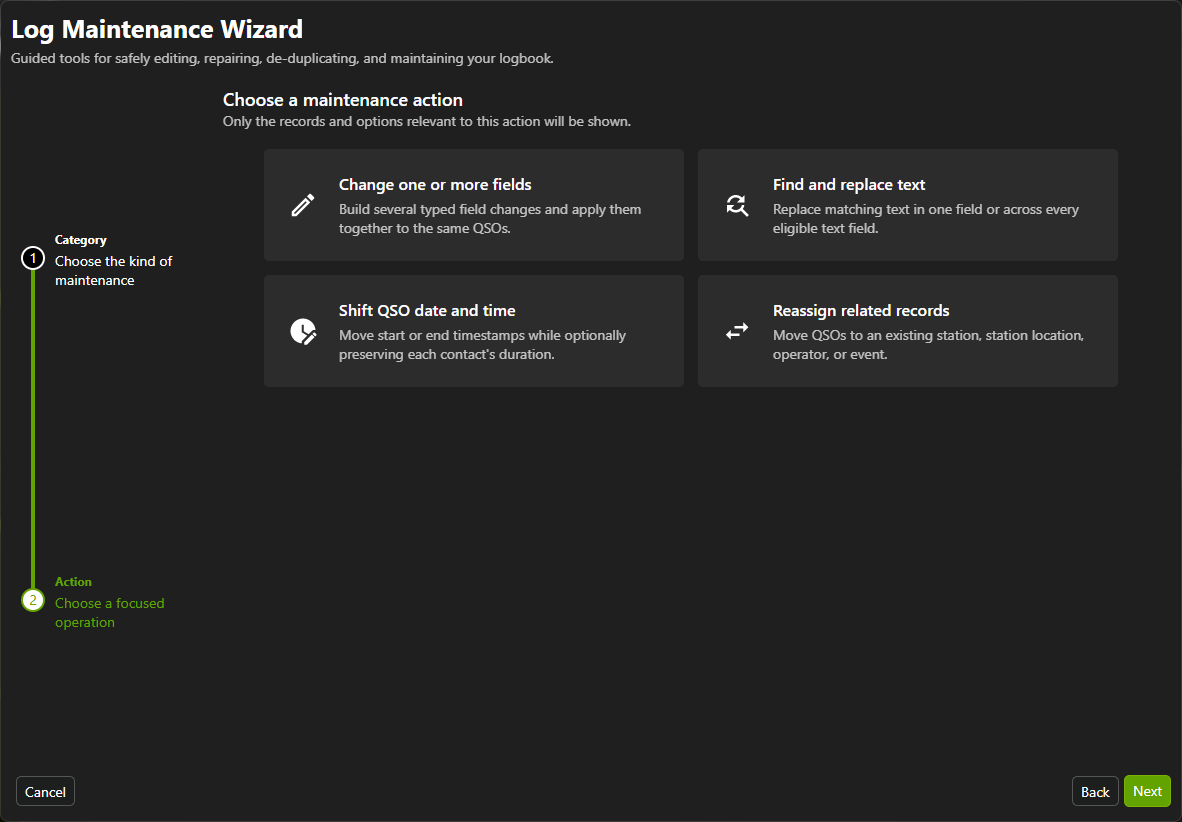
Make corrections across multiple QSOs
Need to correct an incorrectly recorded mode, replace information across multiple contacts or adjust timestamps?
Bulk editing, search and replace, and date/time adjustment tools let you make changes across multiple QSOs without opening and editing every record individually.
Clean up and maintain your data
Identify and remove duplicate contacts, recalculate derived information such as countries, zones and bearings, and check the integrity of your logbook data.
Dedicated database maintenance and optimisation tools help you keep your logbook in good order.
Reorganise your operating history
Operating from different stations, locations or events shouldn't leave your contacts incorrectly assigned.
QSO Director lets you reassign existing QSOs between stations, locations, operators and events, so your logbook continues to reflect how and where you operated.
Bring your existing logbook with you
Already have years of contacts recorded in another logging application? You don't have to start again.
QSO Director supports ADIF import and export, allowing you to bring existing QSO records into the application and export them when needed.
With station-aware import options and extensive log maintenance capabilities, you have the flexibility to organise your existing operating history as you move to QSO Director.
Bring your logbook to QSO Director
WORKED MATRIX
See what you've worked. And what's confirmed.
Your logbook can tell you more than who you've contacted.
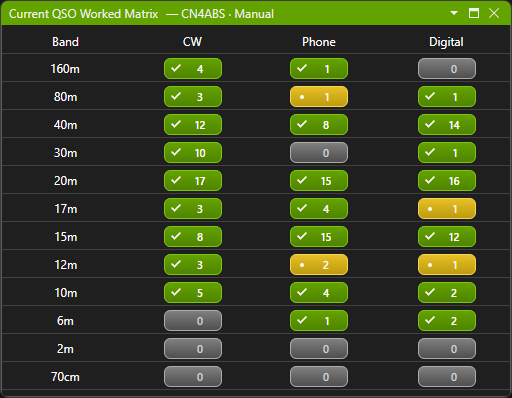
QSO Director's Worked Matrix brings together your worked and confirmed status across bands and modes, helping you see where you've already made contacts, which have been confirmed and where opportunities remain.
Switch between individual callsigns and DXCC entities to explore your operating history from different perspectives, with confirmation information from LoTW and eQSL incorporated into the matrix.
Worked, confirmed or still needed?
See which band and mode combinations you've already worked, which have been confirmed and which remain unworked.
With your logging history and electronic QSL confirmations brought together, you can identify opportunities without manually comparing records across multiple services.
Look beyond a single callsign
Switch to DXCC Entity mode to see worked status for the entire entity rather than just the individual station.
It's an easy way to identify bands and modes where you have yet to make a contact with that DXCC entity.
Relevant to your current station
QSO Director understands that contacts made from one operating station aren't necessarily part of another station's worked history.
By default, worked-status information reflects the currently selected station's logbook, keeping the results relevant to where you're operating.
MULTI-STATION & CLOUD SYNC
One connected logging environment. Wherever you operate.
Your amateur radio operating doesn't have to be tied to a single station or computer.
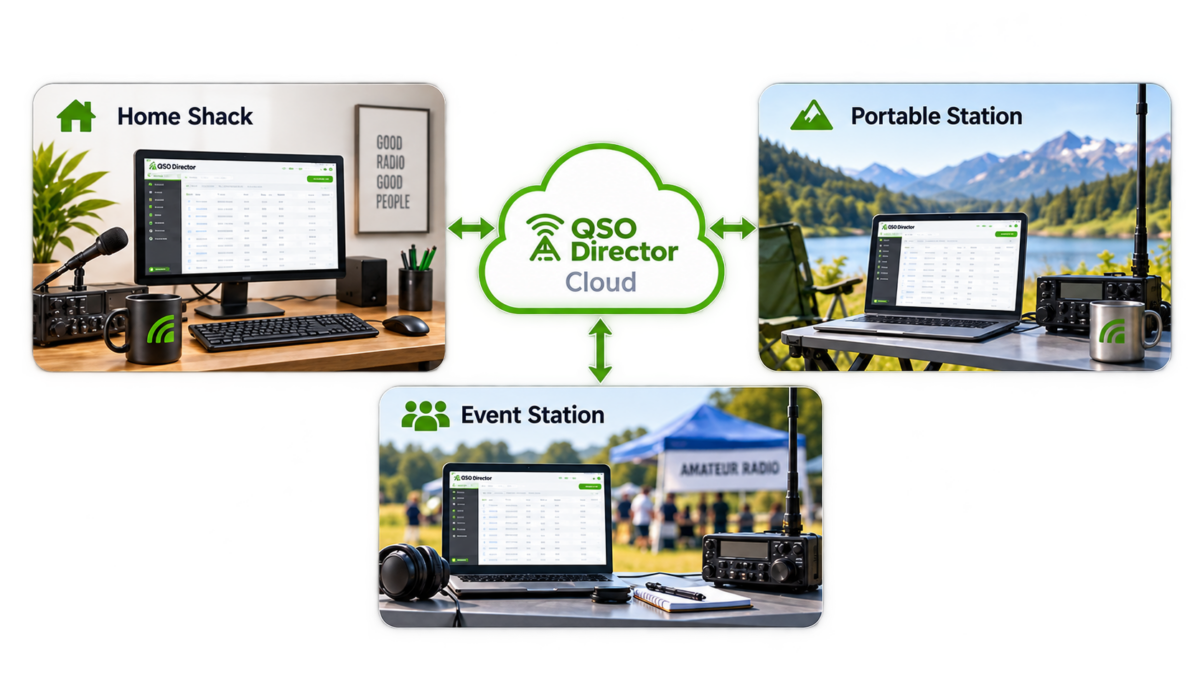
Whether you're logging contacts from your home shack, operating portable or using another computer, QSO Director brings your operating history together through automatic cloud synchronisation, while keeping the information associated with each station organised.
Different stations. The right operating history.
Configure multiple stations and operating locations within QSO Director, with contacts recorded against the station from which they were made.
Each station maintains its own worked history by default, so your logging information remains relevant to where you're operating.
Your logbook, across your computers.
QSO Director Cloud automatically synchronises QSO records between your installations.
Work from your main shack computer, switch to a laptop or operate from another location, without repeatedly exporting and importing log files to keep your records together.
Three stations. One synchronised log.
At DXFest 2026, three separate operating positions used QSO Director throughout the event, with live cloud synchronisation keeping their logging information connected.
A real-world demonstration of how QSO Director can support multi-station amateur radio operation.
CONNECTED LOGBOOKS & INTEGRATIONS
Your logging workflow doesn't stop at the Log button.
Logging a contact shouldn't mean another round of exporting files, uploading QSOs and updating separate applications.
QSO Director connects your logbook with electronic QSL services, online logbooks and digital-mode applications, helping keep your operating records up to date while you concentrate on making contacts.

LoTW integration, without the routine uploads
QSO Director integrates directly with ARRL's Logbook of The World (LoTW), allowing both historical and newly logged QSOs to be submitted automatically.
Once configured, the integration can operate quietly in the background, or you can enable near-real-time uploads to submit new contacts shortly after they're logged.
No need to repeatedly export ADIF files and upload them yourself.
eQSL integration that works in the background
Keep your eQSL.cc activity connected to your logbook without making manual uploads part of your operating routine.
QSO Director can automatically synchronise existing and newly logged contacts with eQSL, with the choice of background operation or optional near-real-time uploads.
Like LoTW, the integration understands QSO Director's multiple stations and operating locations, so contacts retain the context in which they were made.
Your confirmations, reflected in your Worked Matrix
QSO Director downloads and matches confirmation information from LoTW and eQSL, making it available within the Worked Matrix.
See worked and confirmed status across bands and modes for individual callsigns and DXCC entities, without manually comparing your logbook against your electronic QSL services.
Your other online logbooks, connected
QSO Director also supports integration with online logbooks including QRZ.com and Club Log, with automatic uploads and batch options to help keep your records up to date across services.
Digital-mode logging, without duplicate entry
Working FT8, FT4 or other supported digital modes? QSO Director can receive completed QSO information from compatible applications such as WSJT-X, JTDX and WSJT-Z.
Configure the integration and contacts can be added automatically to your QSO Director logbook, reducing the need to enter the same information twice.
Support for standard network data formats also makes it possible to exchange QSO information with other compatible amateur radio applications.
ENGINEERED FOR YOUR OPERATING HISTORY
Your operating history deserves careful engineering.
Some contacts can't simply be worked again. That rare DX station, a memorable QSO or decades of accumulated operating history deserve more than a place in a database.
QSO Director is engineered with that responsibility in mind, from how QSO records are stored and maintained to how your logging information is synchronised between computers.
Transactional database operations
QSO Director uses transactional database operations to help maintain the consistency and integrity of your logging data.
Interruption-tolerant cloud synchronisation
Cloud synchronisation is designed to handle interruptions rather than depend on a continuous internet connection.
5M+ QSOs in large-logbook testing
QSO Director has been tested with logbooks exceeding five million contacts, reflecting the importance of supporting operating histories that continue to grow.
FREQUENTLY ASKED QUESTIONS
Questions about logging with QSO Director?
Whether you're moving from another logging application or exploring how QSO Director fits into your station, here are answers to some common questions.