
See the Bands Differently with QSO Director’s Band Maps
If you’ve ever felt like traditional band maps were clunky, limited, or just didn’t quite keep up with how you operate, you’re not alone.
That’s exactly why QSO Director takes a fresh approach.
Its band maps aren’t just another feature—they’re designed to be fast, fluid, and genuinely useful in real operating conditions. Whether you’re casually tuning around or deep into a contest, they give you the visibility you need without getting in your way.
Clean, Smooth, and Effortless to Use
The first thing you’ll notice is how smooth everything feels.
Scrolling through the band is effortless. Stations are clearly laid out. Frequencies, callsigns, and activity are easy to read at a glance. There’s no lag, no clutter—just a clean, responsive view of what’s happening right now.
It’s the kind of interface that disappears while you’re using it, letting you focus entirely on operating.
All the Information You Actually Need
QSO Director’s band maps are designed to surface useful information without overwhelming you.
At a glance, you can see:
- Active stations across the band
- Callsigns clearly positioned against frequency
- Activity types like POTA, SOTA, or contest exchanges
- Band segments and operating ranges
- Your current position and tuning context
- Worked and Unworked Stations
- Contest Muiltipliers
Everything is presented in a way that makes sense instantly—no digging, no second-guessing.

Run as Many Band Maps as You Want
Here’s where things really open up.
With QSO Director, you’re not limited to a single band map. You can create as many as you like—each one focused on a different band, radio, or purpose.
Want to monitor 20m, 40m, and 15m all at once?
Done.
Running multiple radios?
No problem.
Keeping an eye on other bands while working a pileup?
Easy.
Each band map works independently, giving you a live overview of everything happening across your station.
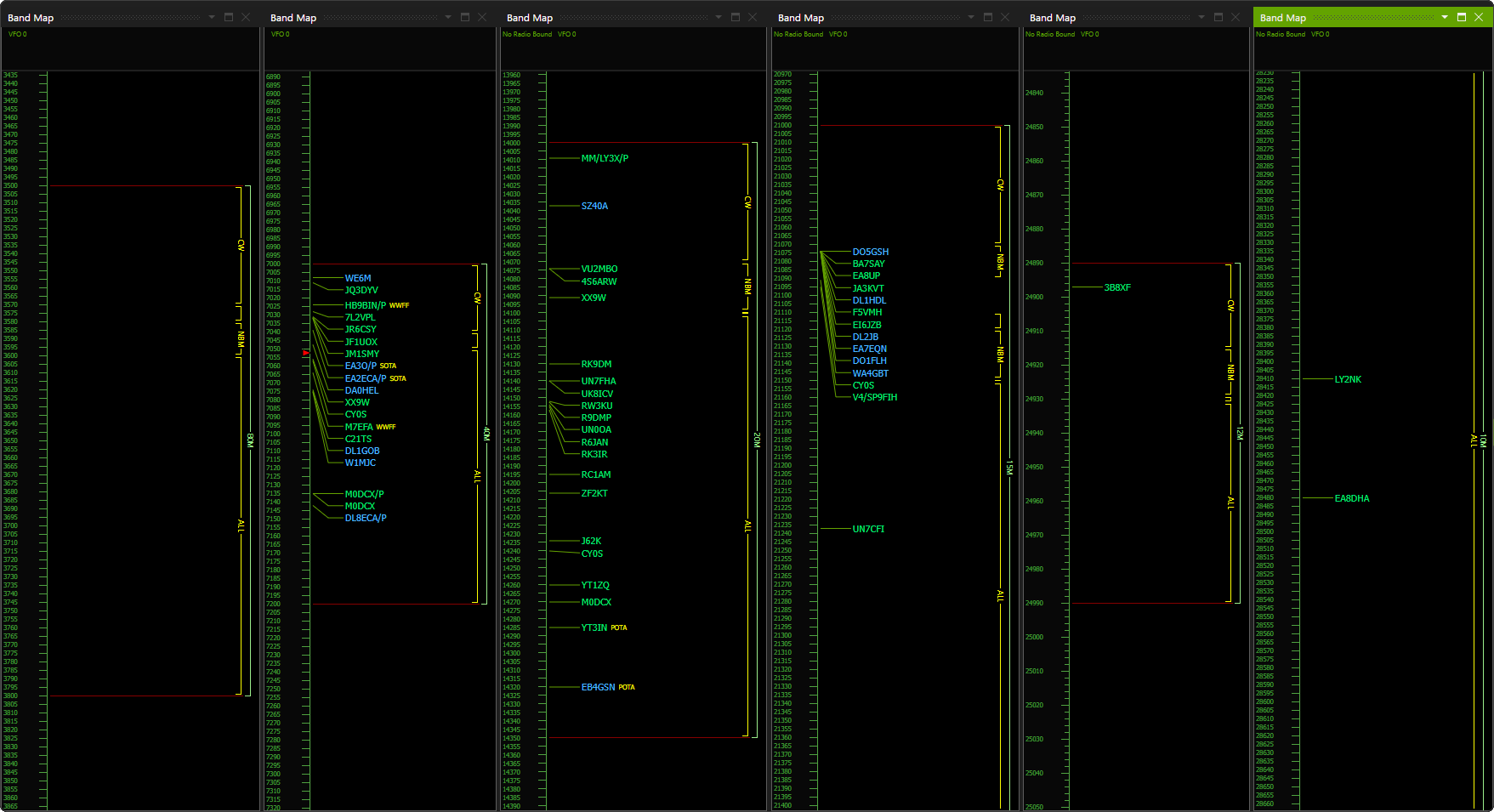
Built for Real Operating, Not Just Display
These aren’t just passive displays—they’re tools built for action.
The layout makes it easy to spot openings, find activity, and jump straight to signals of interest. Whether you’re chasing DX, hunting activators, or scanning for multipliers, the information is right there when you need it.
And because everything is fast and responsive, it keeps up with you—even in high-pressure operating situations like contests.
See them in action
QSO Director’s band maps are designed to give you awareness, speed, and flexibility—all at once.
They’re smooth to use, packed with useful information, and completely scalable to your setup. Run one or run ten—it’s entirely up to you.
Once you get used to having that level of visibility across the bands, operating without it just doesn’t feel the same anymore.